
How to Self-Host an AI Agent on Your Own Machine
A self-hosted AI agent is an agent you run on hardware you control, with your own model keys, that stores its memory and goals locally and keeps working between your messages. This guide installs one, connects a model, gives it a task and a standing goal, keeps it running as a background service, and sets the limits that bound it.
It uses POLYROB, an open-source (MIT) self-hosted AI agent. Every command below comes from the POLYROB install script, CLI and user guides at release v1.7.6. Where something is unproven or not available, the text says so.
What is a self-hosted AI agent, and how does it differ from a chat assistant or a hosted agent?
Three things get called “an AI agent”. They differ in where they run and what they do when you stop typing.
- A chat assistant answers when you talk to it. Between sessions it does nothing.
- A hosted agent can act, but it runs on someone else’s server. Your keys, files and history live there.
- A self-hosted agent can act, and it runs on your machine. Your keys, memory and goals sit in files you own. Only the calls to your model provider, and the tools you switch on, leave the box.
Self-hosted does not mean offline. If you use a hosted model such as OpenAI, Anthropic or Gemini, your prompts go to that provider. If you use a local model, they do not. Step 2 covers both.
POLYROB runs only on your own machine or server. There is no POLYROB account to create.
Why run your own agent?
Three reasons recur.
Your keys. You put your provider key in ~/.polyrob/.env. You choose the provider, you can change it mid-chat with /model, and you pay the provider directly. POLYROB itself is free under the MIT license. With a local model you pay nothing per token.
Your data. Memory, goals, scheduled jobs and sessions are SQLite files under ~/.polyrob/data. Your prompts reach only the model provider you configured and the integrations you turn on. One honest note: since version 1.7.5 the install script sends a single anonymous count after a successful fresh install (version, OS and install method, no ID). --no-telemetry or DO_NOT_TRACK=1 turns it off.
Work that continues between messages. A durable goal board and scheduled jobs survive restarts. The agent can pick up unfinished work on its own. This is off until you turn it on, and it stops at a step cap and a spend cap you control (Step 5).
The cost is real. You install it, you update it, and you are the operator. If you want zero setup, a hosted chatbot is the better fit today.
What do you need?
- A Linux or macOS machine, or Windows with WSL2. Windows without WSL2 is not supported.
- Python 3.11 or newer. The installer fetches a private copy if you do not have one.
- One model: an API key from a provider, or a local model server such as Ollama.
- A terminal. Optional: a Telegram bot token or another chat surface, if you want to talk to the agent from your phone.
The base install is small. Browser automation, vector memory and voice are optional extras, and the all extra is about 2 GB. On your own machine an extra installs itself the first time you use the capability.
Step 1: How do you install the agent?
Run the installer:
curl -fsSL https://polyrob.dev/install.sh | bashIt finds Python 3.11+, clones the source into ~/.polyrob/src, builds a virtualenv, puts a polyrob command on your PATH, and starts the setup wizard.
Read the script first if you prefer:
curl -fsSL https://polyrob.dev/install.sh -o install.sh && less install.sh && bash install.shThe install page also publishes a checksum for the script at https://polyrob.dev/install.sh.sha256.
Useful installer flags:
| Flag | What it does |
|---|---|
--no-setup | Skip the wizard. Run polyrob setup later. |
--no-prompt | Ask nothing. For scripts and images. |
--extras server,browser | Install pip extras up front. |
--branch / --commit | Pin the branch, or an exact commit or release tag. |
--no-telemetry | Do not send the install count. |
--uninstall | Remove the command, the venv and the source. Your data is kept. |
If you already use Python tooling, install from PyPI instead:
pipx install polyrob
polyrob setup
Add extras only as you need them. pip install polyrob gives the core agent, keyword memory and the CLI. The package page is at pypi.org/project/polyrob and the source is at github.com/theselfruleorg/polyrob.
Now check the install:
polyrob doctorpolyrob doctor reports which provider keys are present and usable, what polyrob run will resolve to, the memory backend, and whether autonomy is on. It names the one command that fixes anything missing. If your shell says polyrob: command not found, reload it (source ~/.zshrc). The installer added ~/.local/bin to your PATH.
The full install reference is on the install page.
Step 2: How do you pick a model: hosted or local?
You need one model provider. Pick one of two routes.
Route A: a hosted provider
The wizard asks for an OpenRouter key first, because one OpenRouter key reaches most models. You can use a direct key instead. In ~/.polyrob/.env:
OPENROUTER_API_KEY=sk-or-...
# or ANTHROPIC_API_KEY / OPENAI_API_KEY / GEMINI_API_KEY
OpenAI, Anthropic, Gemini, DeepSeek, OpenRouter and NVIDIA NIM are built in. For Claude specifically, see the Claude AI agent guide. If you pay for a sign-in subscription plan instead of an API key, connect it with polyrob auth add <provider>, and read the terms-of-service warning in the configuration guide first. It is off until you enable it on purpose.
Switch the default later with the picker:
polyrob model set-defaultInside a chat, /model <name> swaps the model live.
Route B: a local model (Ollama, LM Studio, vLLM)
POLYROB talks to any OpenAI-compatible or Anthropic-compatible endpoint you declare in ~/.polyrob/providers.yaml. A local server needs no key:
providers:
  ollama:
    base_url: http://127.0.0.1:11434/v1
    auth_type: none
    transport: chat_completions
    default_model: qwen3-coder:30b
    models: [qwen3-coder:30b]
Then run a task against it:
polyrob run -p ollama "hello"The configuration guide lists Ollama, LM Studio, vLLM and llama.cpp servers as supported the same way: point base_url at the server and declare the models it serves.
Know the limit. POLYROB does not download, size or start a local model for you. You run the model server yourself and POLYROB connects to it. How well an agent behaves also depends on the model, and a small local model will plan and use tools less reliably than a large hosted one. Test your model on a real task before you give it a standing goal. For the full local setup, see how to run an LLM locally.
Step 3: How do you give it a first task, then a standing goal?
Start with a one-shot task:
polyrob run "summarize https://example.com"This uses the web_fetch tool, which turns a URL into markdown with no browser. For exploratory work, open the REPL:
polyrobType a goal and press Enter. The agent acts step by step and prints each action and result. Useful slash commands: /status, /usage, /model, /memory, /tools, /goals, /pending and /pause.
A fresh install is interactive only. The agent acts on your messages and nothing else. Two switches govern the rest:
polyrob config set POLYROB_LOCAL true
polyrob autonomy on
POLYROB_LOCAL turns on the tools you drive: coding, git, knowledge base, cross-session memory. polyrob autonomy on turns on the loops that act without you: the goal board, self-wake, and the agent writing its own skills. The second switch is deliberate. Leave it off until you finish Step 5.
With autonomy on, create a standing goal on the goal board:
polyrob goals create "Draft the weekly report" -b "Summarize this week's notes in ./notes into report.md"
polyrob goals list --status ready
Or schedule a recurring job. Schedules accept a duration (30m), a phrase such as every monday 09:00, or a cron expression:
polyrob job new "every monday 09:00" summarize the week's notes into report.md
polyrob job list
To talk to the agent from your phone, add a chat surface:
polyrob surfaces add telegram
polyrob surfaces list
polyrob surfaces add asks for the surface’s credentials and proves them with a read. A new surface is locked: the agent answers no stranger until you let them in. Telegram, WhatsApp, Discord, Slack, Signal, email, Feishu/Lark and DingTalk are the eight chat surfaces. One agent, one memory, whichever channel you use. For what such an agent should remember and do for one person, see the guide to a personal AI agent.
Step 4: How do you keep it running as a background service?
The terminal REPL stops when you close the terminal. A background service keeps the chat surfaces and the autonomy loops alive. It works on a Mac mini under your desk or on a VPS.
polyrob service install    # systemd user unit (Linux) or launchd agent (macOS)
polyrob service status     # running? which version? anything waiting for a restart?
polyrob service restart    # finish the current work, restart, report the version
polyrob service uninstall  # stop and remove it; your data is untouched
The service runs polyrob gateway, so every surface you enabled starts from one unit. On Linux, run loginctl enable-linger $USER so a user unit keeps running after you log out. The install step prints that reminder.
To update, use:
polyrob update --check     # exit 0 up to date, 10 newer, 1 unknown/error
polyrob update --apply     # snapshot, install, migrate, verify
polyrob update --rollback  # restore the most recent snapshot
--apply is the automated path for a git checkout or editable git install, with automatic rollback if verification fails. For a pip or pipx install, polyrob update prints the exact command to run instead. Goals and jobs live in SQLite and survive restarts, and updates snapshot first.
If you prefer containers on a server, the self-hosting guide documents a Docker Compose path (docker compose up). That path is aimed at server deployments, not the single-user setup above.
Step 5: How do you set limits before you turn on autonomy?
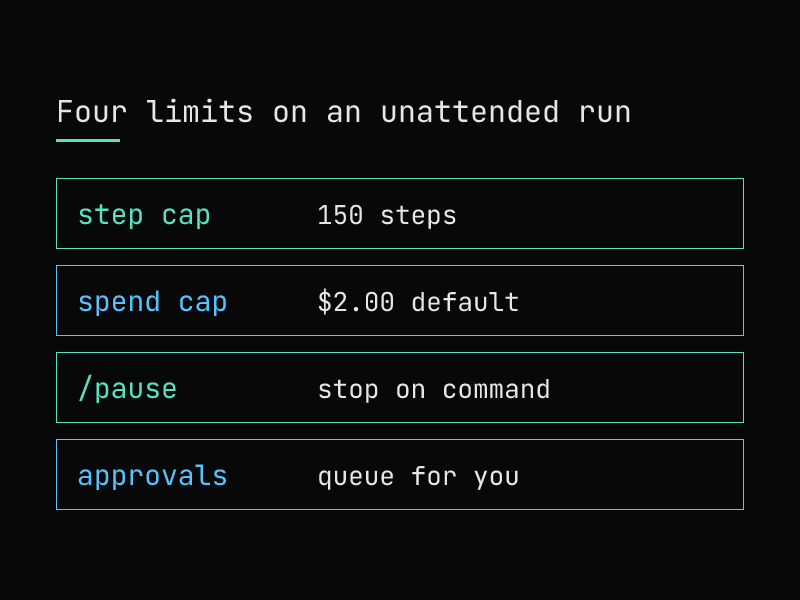
An agent that runs when you are not watching needs limits you set first. POLYROB has four you should know. For the levels of autonomy and the controls to check, see the guide to the autonomous AI agent.
A step cap. Every goal, scheduled job and helper stops at AUTONOMOUS_MAX_STEPS, which defaults to 150 steps per run. The agent cannot set its own step limit.
A spend cap. Every unattended run stops when its provider spend reaches AUTONOMOUS_RUN_BUDGET_USD, which defaults to $2.00 per run (0 turns it off). Sub-agent spend counts. This is a cap per run, not a daily or monthly budget, and the check can fail open if the spend probe errors. Lower it while you learn what your tasks cost:
polyrob config set AUTONOMOUS_RUN_BUDGET_USD 0.5At either cap the run reports once and names the reason it stopped.
A stop button. Send /pause (alias /halt) from your terminal or chat. It is a slash command on purpose: it runs with no model call, so it works when the model does not. You can scope and time it:
/pause background
/pause deploying for 6h
/pause for 2d
From the shell, use polyrob autonomy pause and polyrob autonomy resume. polyrob autonomy status shows every axis of the dial, any active pause and the state of each loop. Plain words such as “stop” typed to the agent are only messages to the agent, never commands. /pause is the gate.
An approval queue. Actions that need your decision wait for you. /pending shows everything waiting, and each item has its own one-tap approval. The agent carries on after you decide.
Wallet and payment features are an opt-in extra and are off by default. The crypto code has had no independent audit. If you ever enable it, start on a testnet with a small cap.
Untrusted input is also handled as data. Web pages, emails and tool output reach the model as untrusted data, so text on a page is not an instruction. This reduces prompt-injection risk. It does not remove it, so keep high-impact tools off until you need them. Skills and identity edits the agent writes wait in quarantine until you approve them.
How do you compare self-hosted AI agents?
You will see many options. Compare them on the same facts. Here is a checklist you can apply to any self-hosted agent, including this one:
- License and hosting. Is it open source, and does it run without an account on someone else’s server?
- Model freedom. Which providers are built in? Can you declare your own endpoint, including a local model?
- Install path. One command, pip or pipx, or a build from source? Does it have a doctor or preflight check that names what is wrong?
- Durability. Does it keep goals and schedules across restarts? Is there a background service?
- Limits. Is there a step cap and a spend cap? Who sets them, you or the agent?
- A stop button. Does one command stop all unattended work, and does it work without calling a model?
- Approvals. Do risky actions wait for you, and can you approve from your phone?
- Defaults. Is autonomy off until you turn it on? Are money features off by default?
- Channels and extensions. Which chat apps, and how large is the skills ecosystem?
- Maturity. How large is the community, and has the risky code been audited?
POLYROB is weaker on a few of these: it supports eight chat channels, not dozens; it has no native phone or desktop apps; it does not set up local models for you; its wallet code is unaudited; and it is a young project with a small community. A dated, sourced comparison lives on the compare page, and Hermes and OpenClaw are compared side by side in Hermes vs OpenClaw. The full feature list is on the capabilities page, and reusable procedures the agent loads on demand are on the skills page. The guides are linked from the docs page.
FAQ
What is the best self-hosted AI agent?
It depends on your answers to the checklist above. For a personal agent that keeps working between messages, runs on your machine and stays inside caps you set, POLYROB is built for that case. For other needs, check the compare page and test against your own task.
Is there a self-hosted AI agent on GitHub I can read before installing?
Yes. POLYROB’s source is MIT licensed at github.com/theselfruleorg/polyrob. The installer is also a readable script, and its checksum is published.
Can I self-host an AI agent without paying for an API?
Yes, with a local model. Declare your Ollama, LM Studio or vLLM endpoint in ~/.polyrob/providers.yaml and use polyrob run -p ollama "...". You supply the hardware and the model. Quality depends on the model.
Does a self-hosted agent keep my data private?
Memory, goals and sessions stay in files on your machine. The calls to your model provider carry your prompts, so a hosted model sees them. A local model does not leave your machine. The tools you switch on, such as web browsing or email, reach those services. The installer sends one anonymous install count unless you pass --no-telemetry.
How do I stop it?
Send /pause in chat or the REPL, or run polyrob autonomy pause in a shell. To remove it, run polyrob uninstall. Your data is kept unless you add --purge.
How risky are the wallet features?
They are unaudited and opt-in, and off by default. Do not put funds you cannot lose behind them.
Install it
You have the commands. The shortest path is two lines:
curl -fsSL https://polyrob.dev/install.sh | bash
polyrob doctor
Install POLYROB and start with one polyrob run task before you turn on autonomy.
POLYROB is an open-source AI agent you run and own. Install it or read the docs.